GEO: getting cited by AI
Éclair’s built-in GEO helps you get cited by AI: llms.txt, a Markdown version of every page, rules for 30 AI bots and a GEO score in the editor.
Contents
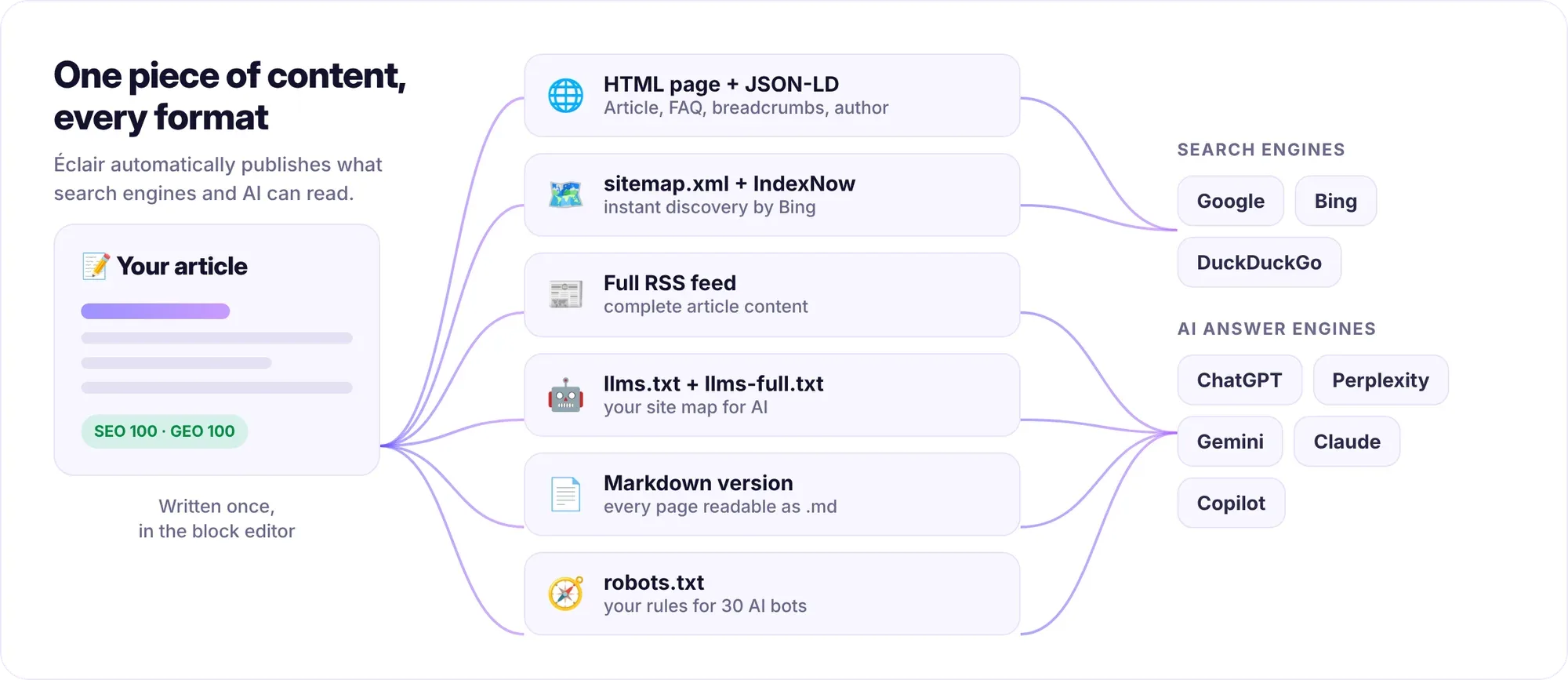
GEO (Generative Engine Optimization) helps your site get cited by AI: ChatGPT, Perplexity, Gemini, Claude or Google’s AI Overviews. Éclair publishes formats that are easy for them to read, such as llms.txt, lets you decide which bots can access your text and scores each piece of content so it’s clear, structured and trustworthy.
Why aim to get cited by AI?
More and more questions get their answer directly in an answer engine, without a click on a classic search result. Being cited as a source in those answers is becoming a visibility channel in its own right. Classic SEO remains the foundation (see the SEO guide), and GEO builds on it. The article GEO: how to get your site cited by ChatGPT details the editorial strategy.
What does Éclair publish for AI, from llms.txt to Markdown?
Everything is generated automatically and updated every time you publish:
| Format | URL | What it’s for |
|---|---|---|
llms.txt | /llms.txt | Your site’s map for AI, in the format proposed by llmstxt.org |
llms-full.txt | /llms-full.txt | All your content in Markdown, in a single file |
| Markdown version | Add .md to any URL | Clean text, with no menu or decoration, that AI reads effortlessly |
| Bot rules | /robots.txt | Who can read your pages, bot by bot |
| Structured data | In every page | Article, FAQ, author, breadcrumbs, in JSON-LD format |
The llms.txt file starts with your site’s name, its description and your business intro for AI, which you write in Settings › AI & GEO. Next comes the list of your pages and posts, each with its summary, then your categories. Each Markdown version starts with a metadata header and is sent with the X-Robots-Tag: noindex HTTP header and a canonical link to the original page: it creates no duplicate content.
Which AI bot policy should you choose?
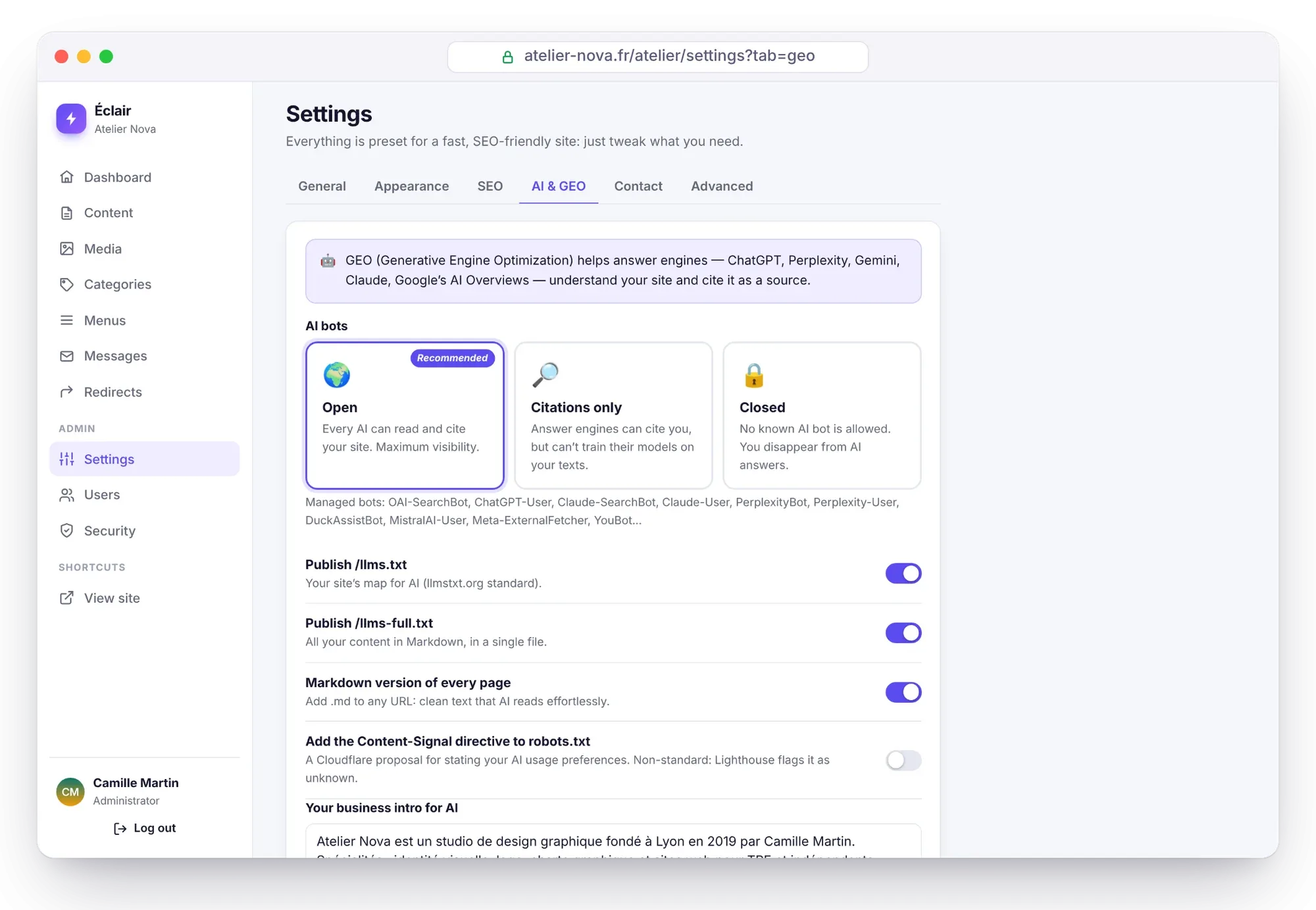
In Settings › AI & GEO › AI bots, you have three choices. Éclair writes the matching rules into robots.txt for 30 known bots.
| Policy | AI answer engines | Model training | Effect |
|---|---|---|---|
| Open (recommended) | Allowed | Allowed | Maximum visibility in AI |
| Citations only | Allowed | Refused | You get cited, but your texts don’t train models |
| Closed | Refused | Refused | You disappear from AI answers |
Answer engines visit your site to answer a question, and can cite you: OAI-SearchBot, ChatGPT-User, Claude-SearchBot, Claude-User, PerplexityBot, Perplexity-User, DuckAssistBot, MistralAI-User, Meta-ExternalFetcher and YouBot.
Training bots collect text to train models: GPTBot, ClaudeBot, anthropic-ai, Google-Extended, Applebot-Extended, CCBot, Bytespider, Meta-ExternalAgent, FacebookBot, cohere-training-data-crawler, cohere-ai, Amazonbot, Diffbot, Omgilibot, omgili, AI2Bot, PanguBot, Timpibot, ImagesiftBot and img2dataset.
The robots.txt file is a convention: reputable bots follow it, others don’t. It’s still the recognized way to state your choices.
How is the GEO score calculated?
In the editor, the Analysis tab shows a GEO score out of 100, next to the SEO score. It rewards what makes content easy to understand and to quote:
| Check | What to aim for |
|---|---|
| “Key takeaways” | A summary of 25 to 90 words that AI can quote as is (the check that carries the most weight) |
| Direct introduction | The answer in the first lines, in under 70 words |
| FAQ | A FAQ block, automatically marked up as FAQPage |
| Subheadings | At least one subheading phrased as a question (“How…?”) |
| Lists or tables | Data that’s easy to extract |
| Concrete figures | Statistics, prices, durations: they make content quotable |
| Sources | At least one link to a reliable external source |
| Author | A profile with a bio of at least 40 characters |
| Paragraphs | No paragraph over 120 words |
| Freshness | Content published or updated within the past year |
The FAQ, subheading and source checks apply to posts and to pages over 400 words.
Why does the author matter for getting cited by AI?
Search engines, like AI, trust content more when it’s signed by an identifiable, competent person: that’s the E-E-A-T principle (experience, expertise, authoritativeness, trustworthiness). In My profile, fill in your job title, bio, photo and online profiles. Éclair shows an author box below each post, creates your author page and links your profiles through the sameAs property of the structured data.
How do you check what AI sees?
Three URLs are enough to check your site the way an AI would:
https://your-site.com/llms.txt
https://your-site.com/blog/your-article.md
https://your-site.com/robots.txt
The first file lists your content and its summaries, the second shows your article in Markdown, and the third displays the rules for each bot. If a page doesn’t appear in llms.txt, check that it’s published and not set to noindex.
Questions about GEO
Does GEO replace SEO?
No, it builds on it. Answer engines rely heavily on well-ranked, well-structured pages: good SEO remains the foundation. Éclair handles both at once.
Can I get cited by AI without my texts being used to train models?
Yes: choose “Citations only” in Settings › AI & GEO. Answer engines can read and cite your pages, while training bots are refused in robots.txt.
Should I fill in “Key takeaways” for every piece of content?
It’s recommended: it’s the check that carries the most weight in the GEO score. In 2 or 3 sentences, give the direct answer to the question your reader is asking.
Where do I find the Markdown version of a page?
Add .md to the end of its URL, for example /en/documentation/geo.md. You can turn this option off in Settings › AI & GEO if you don’t want it.